
“Cyber Traffic Control & Digital Tollway”
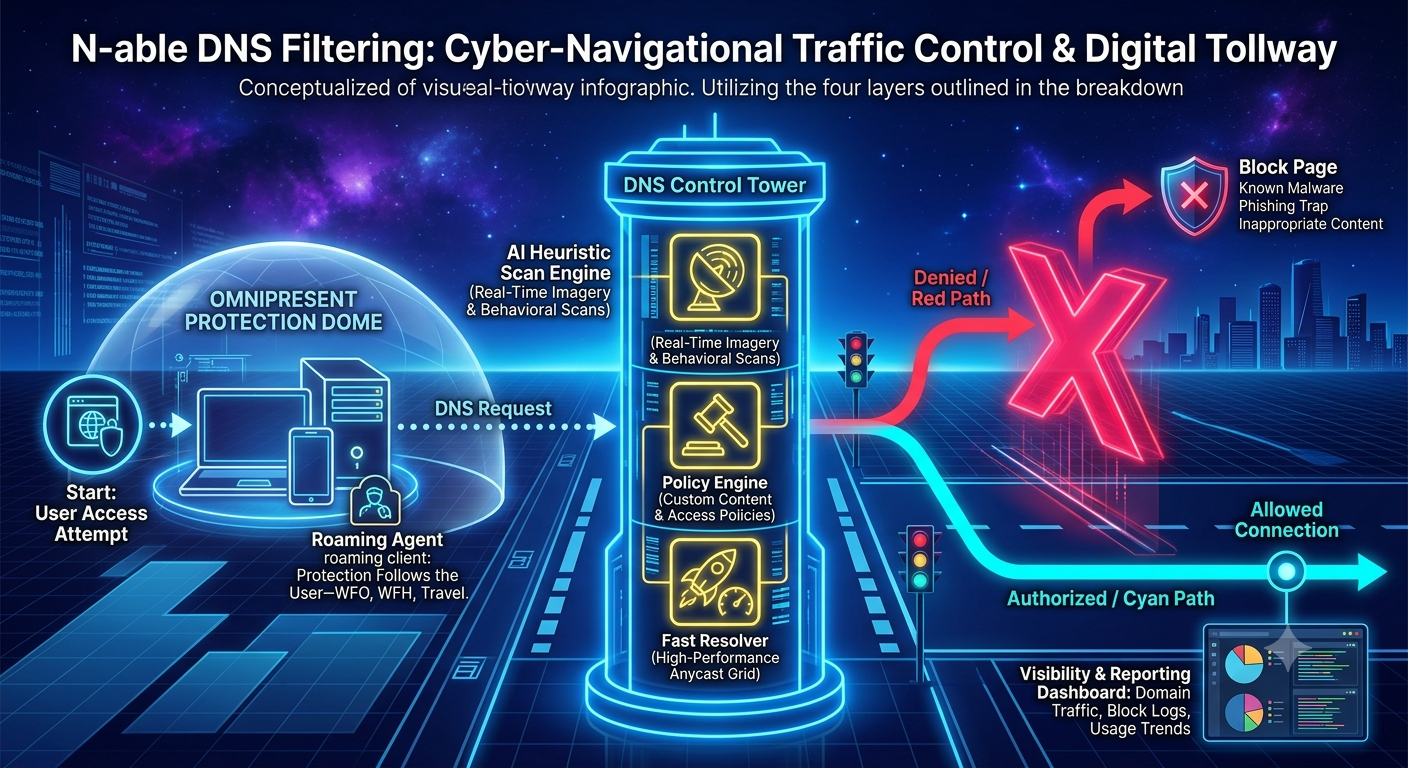
Think of the DNS Filtering application as a high-speed, intelligent Traffic Control System for your entire internet journey. Before your computer ever loads a website, sends a message, or connects to a cloud server, it has to ask this digital control tower for directions.
Within a fraction of a millisecond, the system checks the destination against a massive AI database. If you clicked a safe link, you are fast-tracked down a clean road. But if you accidentally clicked a phishing link, malware site, or a scam trap, the system acts like a physical barrier, instantly blocking the road and keeping you completely out of harm’s way before any danger can touch your device.
Layer 1:
The Request and the Roaming Agent
(The Left Side):
On the left side of the graphic, you see your devices and endpoints (laptops, smartphones, and office computers). Wrapped around them is an Omnipresent Protection Dome. This is made possible by a tiny, lightweight ‘Roaming Agent’ installed on your device. Whether you are working at your desk in the office, sitting on your home Wi-Fi, or using a coffee shop’s public internet, this protective dome follows you. Every time you try to go to a website, your device sends a ‘DNS Request’ toward the center.”
Layer 2:
The DNS Control Tower
(The Center):
In the middle is our DNS Control Tower. This is where the decisions are made in the blink of an eye. The tower does three things simultaneously:
- AI Heuristic Scanning: It uses global artificial intelligence to scan every corner of the web in real-time, instantly recognizing newly created scam sites or suspicious behaviors.
- Policy Enforcement: It checks our customized company rulebook. If we want to block distracting or inappropriate content categories for safety or productivity, the tower enforces those rules here.
- Fast Resolver: It does all of this on a lightning-fast global network, meaning your internet actually loads faster and more reliably than traditional, unprotected connections.”
Layer 3:
The Fork in the Road—Allowed vs. Blocked
(The Right Side):
Once the control tower evaluates your request, it splits the path.
- The Red Path (Blocked): If you accidentally clicked on a dangerous link or a known malware site, the tower blocks you instantly with a giant ‘X’. You are redirected to a safe, corporate ‘Block Page’ explaining why the site is dangerous. The threat never even has a chance to download onto your machine.
- The Cyan Path (Authorized): If the road is safe, you are zipped right through on a clean, secure connection. At the bottom right, our dashboard keeps track of all these logs, giving us complete visibility into what threats we’ve blocked and keeping our network clean.”
The Ultimate Benefits
Preemptive Prevention vs. Cleanup: The massive benefit here is Preemption. Most antivirus software has to wait until a virus is actively downloading onto your computer to fight it. Our Advanced DNS Filtering and Web Protection stops the connection before the download can even begin. It’s like the difference between just wearing a seatbelt and holding on tight versus actually stopping the car before it enters a dangerous intersection.
Protection Beyond the Office Walls: Because of the roaming agent, employees don’t lose their protection when they leave the office. Your company policies and security shields remain active on their work laptops and devices wherever they go.

OTHER INFOGRAPHICS:
Sophisticated Gateway Security Appliance
SOC-Managed Endpoint Detection & Response
Advanced DNS Filtering and Web Protection